How to Stop Receiving Newsletters from JICA-Learning Network
You can stop receiving newsletter emails from JICA-Learning Network by following the steps below.
Important:
Selecting "Do Not Receive" will stop almost all emails from JICA-Learning Network, except for a limited number of essential system email(such as User Registration, User ID/Password,and Email Address Certification notes).
If you have not yet completed the course you assigned, do not change this setting. Otherwise, you may miss important information regarding the course.
Selecting "Do Not Receive" will stop almost all emails from JICA-Learning Network, except for a limited number of essential system email(such as User Registration, User ID/Password,and Email Address Certification notes).
If you have not yet completed the course you assigned, do not change this setting. Otherwise, you may miss important information regarding the course.
Step1: Open the Environment Settings Page
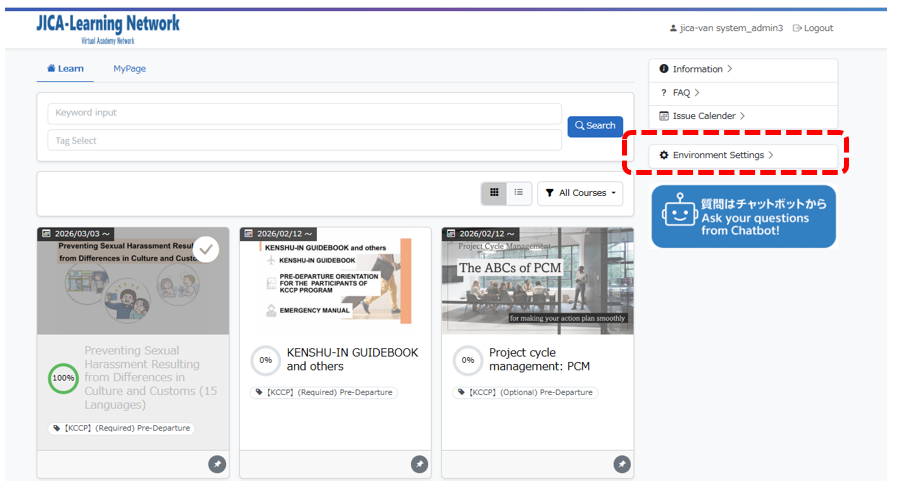
After loggin to the JICA-Learning Network , click "Environment Setting" from the menu on the right side of the screen.
Step2: Access Email Reception Settings
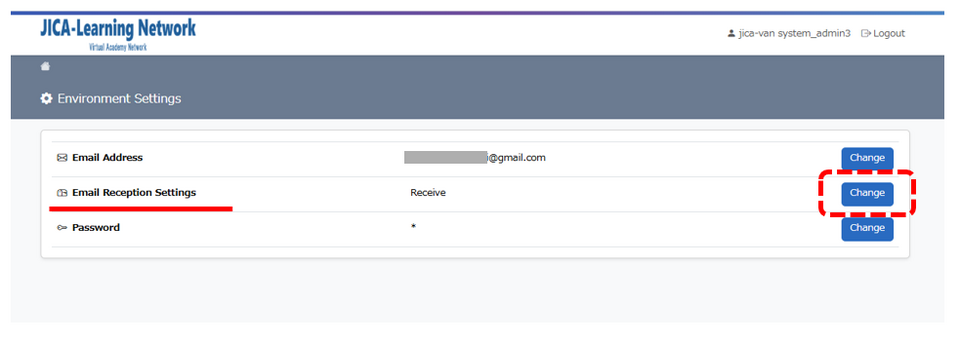
On the Environment Settings page, click "Chage" next to "Email Reception Settings".
Step3:Disable Email Notifications
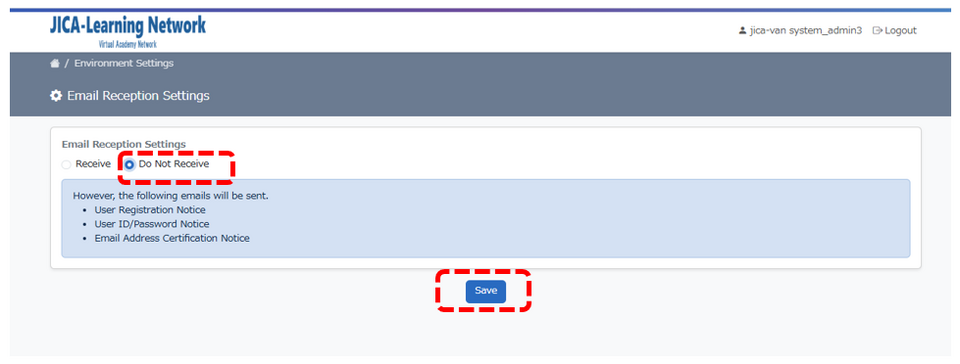
Select "DO Not Receive" and then click the "Save" to apply the changes